The customer already knows you. Give them a selection worth coming back for. Sellivo brings signup, product selection, a branded catalog and WhatsApp delivery into one flow.
Included in Growth and Scale. WhatsApp marketing limits and provider charges apply.
Same store. Different wish lists.
Maya comes back for everyday staples. Noa is looking for her next evening outfit. Give each of them a reason to open your next edit.
Choose a customer to see their newsletter.
You review each customer’s selection before it goes out.
Boutique templateThe October edit
FORMEA few things with your name on them.
Wear it on repeat.
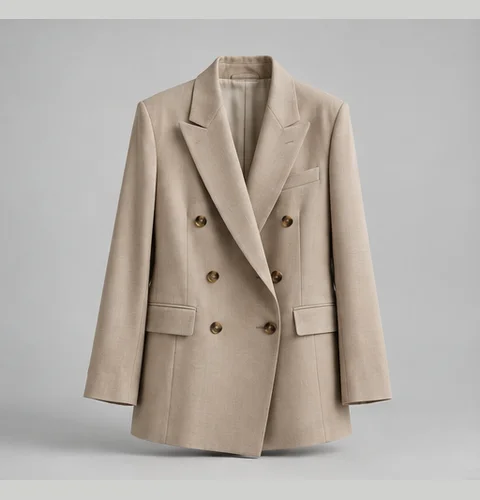
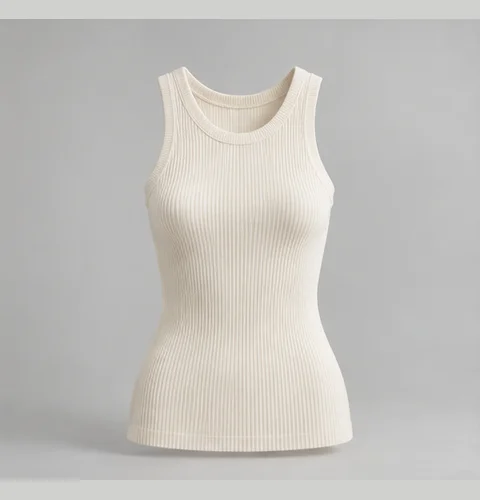
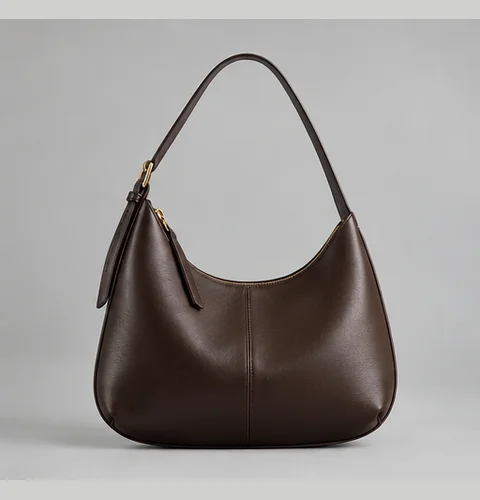
Good pieces earn their place. A softer knit, a better-cut blazer, a bag that goes everywhere. Meet your new regulars.
Maya, meet your everyday favourites.
Easy layers. Nothing to overthink.
The sand blazer
Relaxed tailoring
₪349
The ribbed knit
Your layering essential
₪129
The everyday shoulder bag
Chocolate, naturally
₪279
Find your next favourite
Delivered in WhatsApp. Opened as your branded catalog.
Sample boutique, products and prices. Illustrative selections.
From a first hello to the next purchase.
1
They choose to join
Signup → WhatsApp confirmation
Yes, send me updates from the store.
A form on your Shopify store starts the conversation. The shopper confirms in WhatsApp. An optional welcome coupon gives eligible first-time subscribers a reason to start.
2
You review the selection
Your review, before sending
New arrivals · Bestsellers · Products on sale
Review the batch, open a recipient’s catalog and remove products for one shopper or everyone. Approve the exact version that will be sent.
3
The catalog brings them back
WhatsApp → Catalog → Your store
A few things we thought you would like.
A WhatsApp message opens a branded product catalog with links to your store. Follow clicks and attributed orders, with an unsubscribe option in every newsletter.
Illustrative example
One newsletter. A selection for each customer.
Use purchase history, reviews, linked browsing and cart activity, wishlists, likes and stated preferences to choose relevant products. Customers without enough history receive a general selection. Exclusions and availability checks keep the selection useful.
A campaign you can make your own.
Grow your list in your store
Use a theme form, popup or signup bar on Shopify. Configure the message and optional welcome gift, with WhatsApp confirmation before subscription.
Choose what goes into the catalog
Set product sources, match strength, exclusions and repurchase categories. Review the reasons behind a recipient’s recommendations.
Make the page feel like your brand
Choose Hero, Boutique or Lookbook. Set your brand color, headline and introduction, in a catalog that supports Hebrew, English and mobile.
Send on your terms
Require batch approval or enable scheduled automatic sending. Consent, stock and recent purchases are checked again before dispatch.
Before your first send
Who receives the newsletter?
Only shoppers who opted in. They can confirm through WhatsApp after signup, accept the bot’s invitation or ask an agent to subscribe them. Every newsletter includes an unsubscribe option.
Can I approve what each person receives?
Yes. Review the batch summary and each recipient’s saved catalog. Remove a product for one recipient or the whole batch, then approve the current version.
Does it replace an email newsletter?
This is a WhatsApp newsletter. It sends a WhatsApp message linking to your branded catalog. It is separate from Sellivo’s email inbox.
What is included in the plan?
The newsletter is available on Growth and Scale, with a connected WhatsApp Business account. Marketing sends share your plan’s WhatsApp marketing allowance; provider charges apply separately. Signup forms and welcome gifts described here are for Shopify stores.